0208 993 4500
 dental@schoolofdentalnursing.com
 +44 7856 755880
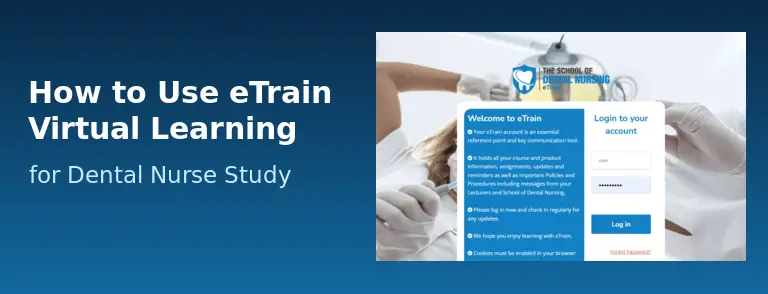
Here’s something most new students don’t expect: logging in is not the same as learning. You can watch every video, download every resource and still feel unsure when it matters. eTrain virtual learning works best when you treat it less like a library and more like a training partner: one that teaches you, tests you and tells you honestly where you need to improve.
If you’re completely new to dental nursing, this guide starts from scratch. By the end, you’ll know what eTrain does, what it doesn’t do, and a simple routine that turns online study into real understanding.
A Few Terms in Plain English
Before we go further, here are the words you’ll see most often:
- Dental nurse: the person who supports the dentist and the patient during treatment, preparing instruments, keeping the surgery clean and safe, and helping patients feel at ease.
- NEBDN: the National Examining Board for Dental Nurses, the awarding body for the Level 3 Diploma in Dental Nursing.
- GDC: the General Dental Council, which registers dental professionals in the UK.
- eTrain: the School of Dental Nursing’s Virtual Learning Environment (VLE). Think of it as your online classroom.
- PoE (Portfolio of Evidence): your record of practical work and experience gathered in a real dental practice. It lives on a separate platform.
What eTrain Virtual Learning Gives You
eTrain brings three things together, and each one has a different job:
- Video lessons and learning resources: the teaching.
- Structured homework: the practice.
- Tutor feedback: the coaching.
Think of learning to drive. The videos are your Highway Code, the homework is your time behind the wheel, and the feedback is your instructor saying, “Check your mirror before you pull out.” Skip any one of those and progress stalls.
On the Diploma in Dental Nursing Online course, eTrain is where the theory side of your training is delivered.
Know Where Every Task Belongs
A lot of early stress has nothing to do with dental nursing itself. It comes from not knowing where a piece of work should go. Separating the signal (what this task is for) from the noise (everything else on screen) saves hours.
|
Platform |
What it’s for |
How to use it |
|
eTrain |
Video lessons, resources, homework and tutor feedback |
Learn the theory, complete learning activities and spot topics to revise |
|
PoE platform |
NEBDN Portfolio of Evidence work |
Complete the evidence and portfolio tasks your training pathway requires |
The golden rule: finished eTrain homework is not automatically Portfolio of Evidence. If you’re unsure, ask before you submit. A simple script:
“Hi [Tutor’s name], I’ve finished the homework on [topic]. Is this for learning only, or should any of it go into my PoE?”
A Simple Six-Step Routine for Every Topic
- Preview the topic. Read the title, the instructions and the task. Note any unfamiliar words.
- Study the material in order. Work through the related videos and resources rather than jumping between unrelated topics.
- Take notes in your own words. Copying feels productive; rewording proves you understand.
- Write down your questions. “What’s the difference between X and Y?” gives your tutor far more to work with than “I’m confused.”
- Complete the homework. Use the resources for support, but answer from your own understanding, and check you’ve covered every part.
- Review the feedback. Note what was right, what needs changing and what you’ll do next.
Here’s why this works: there’s a big gap between recognising something (“I’ve seen this before”) and explaining it. Homework is where that gap shows up, while it’s still easy to fix.
Turn Tutor Feedback Into Real Progress
It’s tempting to glance at returned work, see it’s “done” and move on. But think one step further. An unfixed misunderstanding rarely stays in one place: it can resurface in the next topic, in your revision and in your exam. A few minutes now saves far more later.
When feedback arrives:
- Read all of it once before changing anything.
- Find the underlying issue: a wrong fact, a missing detail or unclear wording.
- Revisit the matching eTrain lesson or resource.
- Rewrite the correction in your own words, then compare it with your tutor’s comment.
- Add any wider weak area to your revision list.
- If something’s still unclear, ask one precise follow-up question.
The real value of feedback isn’t the correction itself. It’s understanding why the answer needed improving, so you don’t repeat the same gap.
Revise Where It Matters Most
Not every topic needs equal attention. Often, a small number of weak spots cause most of the trouble. Your notes, corrected homework and question list already show you where those are.
For each weak area, try this:
- Return to the relevant material and summarise the key points.
- Close your notes and explain the topic out loud, as if teaching a friend.
- Compare your explanation with the course resources and record what you missed.
This supports exam preparation, but no study method guarantees a result, and it doesn’t replace formal qualification requirements. Keep revision work separate from your PoE unless your tutor says otherwise.
What Online Study Can’t Do for You
Online dental nursing is a way of delivering theory. It is not a fully remote alternative to clinical experience. You still need to work in a dental practice, build practical competence under supervision and complete your portfolio requirements.
Why does that matter? Dental nurses work within a defined scope of practice: the set of tasks you are trained, competent and allowed to carry out. Like a learner driver needing real road hours, you can’t build that competence from videos alone. The GDC sets out what registrants are expected to uphold in its Standards and Guidance, and the NEBDN oversees the qualification itself.
You can read more about how theory and practice fit together in the School’s guide to online dental nursing and whether it’s right for you.
Is Online Study Right for You? Try Thinking Backwards
Instead of asking “How do I succeed?”, ask: “How would I guarantee falling behind?” Most people’s answers look like this:
- Never set fixed study times.
- Leave feedback unread.
- Mix up eTrain tasks and PoE work.
- Stay quiet when instructions are unclear.
- Assume “online” means no practical experience.
Now flip each one into a habit. That’s your study plan. Distance learning can suit working adults, career changers and people with family commitments, because the theory can be studied from anywhere in the UK. But flexibility means you build the structure. If your schedule changes, tell the teaching team early rather than letting unfinished work pile up.
Who to Contact When You’re Stuck
- Login, access or admin problems: the administrative team.
- Course content, homework or feedback questions: your tutor.
When you ask for help, include the topic, the instruction that’s causing difficulty, what you’ve already tried and the specific answer you need. For more on fees, delivery and support, see the School’s dental nursing course FAQs.
Your eTrain Study Checklist
- Confirm whether the task belongs in eTrain or PoE.
- Preview the topic and read the instructions.
- Study the relevant videos and resources in order.
- Take short notes in your own words.
- Write down questions for your tutor.
- Complete and check your homework.
- Read all your feedback, then act on it.
- Add weak areas to your revision list.
- Keep PoE work separate unless told otherwise.
Frequently Asked Questions
Does eTrain replace practical dental practice experience?
No. eTrain supports theory and learning activities. You still need practical experience in a dental practice and must complete your Portfolio of Evidence requirements.
Where do I complete NEBDN Portfolio of Evidence work?
On the separate PoE platform, not as ordinary eTrain homework. If you’re unsure about a portfolio requirement, ask your tutor.
Who do I contact if I can’t access my eTrain account?
The administrative team handles access, technical and admin queries. Your tutor handles questions about course content, homework and feedback.
Ready to Take Your First Step?
Every confident dental nurse started exactly where you are now: curious, a little unsure, and willing to learn. eTrain virtual learning gives you the structure; your habits turn it into progress.
Ready to step into your potential and start your dental nursing career? Apply Now – School of Dental Nursing Application Form
Have questions, or want to talk it through with an experienced educator first? Book a Call with an Advisor